
INSTALLATION GUIDES / WIRING
RGBW Wiring Instructions
Connect your LEDs, matching drivers, splitter, and remote module using the wiring diagram and steps below.
How do you wire the LEDs and controller?
Connect each LED to its matching driver, ground the black driver wire, and connect the drivers through the splitter to the remote module. The yellow driver wire provides the optional turn-signal input. Connect controller power and ground as specified for your kit, then test the lighting.
Guide by Lighting Trendz · Updated October 27, 2026
RGBW Wiring Diagram
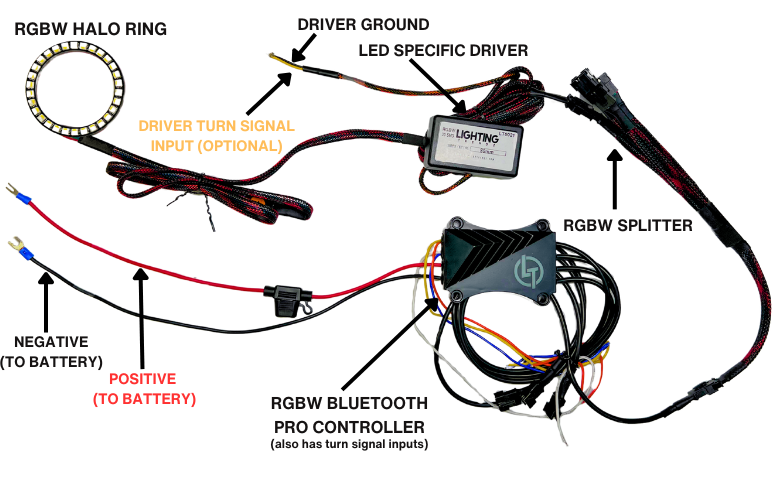
1. Lay Out Your Components
Lay out all LEDs, drivers, the splitter, and your controller. Check that you have the correct parts for your kit before connecting them.
Keep power disconnected while making or changing connections. Follow the labels and instructions supplied with your kit; contact us if your hardware differs from the diagram.
2. Connect LEDs to Their Drivers
Connect each LED to its corresponding driver. For example, a 55mm halo connects to the 55mm driver. Keep the matched drivers in the circuit.
3. Ground the Driver & Connect the Optional Turn Signal
The black wire from each driver must be grounded or the LEDs will not function properly.
The yellow wire from the driver is the optional turn-signal input. If using this function, connect it to the appropriate vehicle turn-signal circuit according to your kit and vehicle instructions. Confirm the circuit before connecting.
These wire functions refer to the driver shown in this guide. Follow the labels on your exact hardware.
4. Connect the Drivers & Controller
- Connect the drivers to the splitter.
- Connect the splitter to the remote module.
- Check that all matching connectors are fully seated and aligned. Do not force them.
5. Connect Power & Test
After checking the wiring, connect the controller’s power and ground to the power source specified for your kit. Follow the positive and negative connections shown in the diagram and keep the supplied fuse in place.
Power on and test each light using the instructions for your controller. If connected, test the optional turn-signal function on the corresponding side. Disconnect power before correcting any connections.
Secure the wiring away from heat, moving parts, sharp edges, and pinch points before finishing the installation.
Troubleshooting
LEDs do not function properly
Disconnect power and check the black ground wire on each driver, the controller power and ground, and the supplied fuse. Confirm that each LED uses its corresponding driver.
Only one LED does not work
With power disconnected, inspect that LED’s driver connection, driver ground, and splitter connection. Look for loose or damaged plugs before retesting.
The optional turn signal does not work
Check the yellow driver input and confirm it is connected to the appropriate turn-signal circuit for that side of the vehicle. Follow your kit’s instructions if the vehicle signal requires additional integration.
Common Questions
Does the black driver wire need to be grounded?
Yes. The black wire from the driver shown must be grounded for the LEDs to function properly.
What is the yellow driver wire for?
It is the optional turn-signal input. Use the correct vehicle turn-signal circuit and follow the instructions for your kit.
Can I use any driver with my halo?
Match the LED to its corresponding driver. For example, use the 55mm driver with the 55mm halo.
What connects to the controller?
The LEDs connect to their matching drivers, the drivers connect to the splitter, and the splitter connects to the remote module.
Need Help With Your Wiring?
Send our team your kit details and clear photos of the drivers, controller, and connections.